Eduskyline Eduskyline
School Management Platform

One platform to run the whole school.

Eduskyline is the academic operating system your whole school runs on — attendance, safeguarding, behaviour, teaching, assessment and communication in one connected platform. Built for education, not adapted from business software.

What's inside
Course WorkspaceAI Planning & AssessmentGrades & ReportingAttendance & SafeguardingBehaviour ManagementInsights & AnalyticsCommunication HubCommunity SpaceEngagement & RewardsTimetable & ScheduleAdministration Console
The Flagship · The Dashboard

One screen. The whole school.

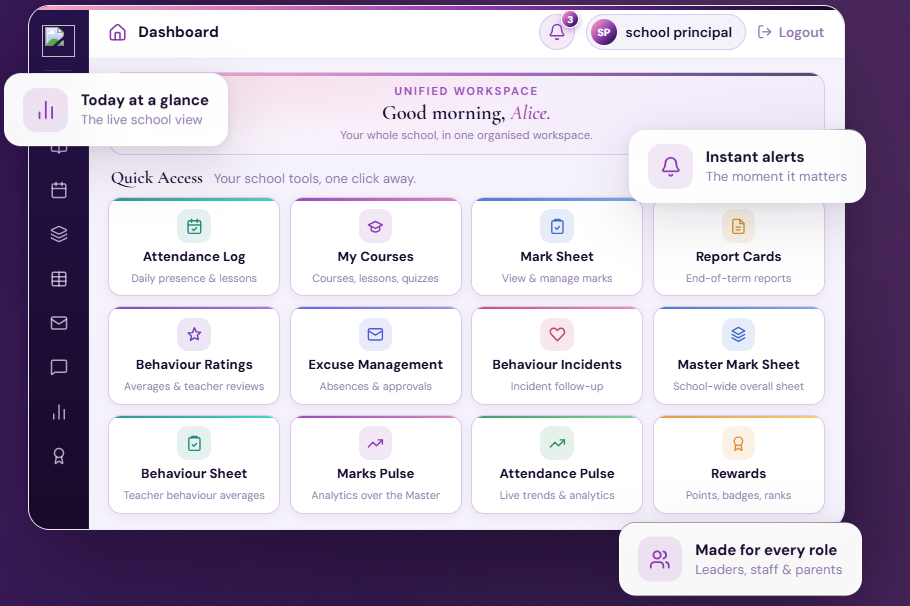
The whole-school command center. Attendance, academics, behaviour, communication and safeguarding alerts in one live view — so leadership and teachers always know what's happening, right now.

Today at a glance
The live school view
Instant alerts
The moment it matters
Made for every role
Leaders, staff & parents
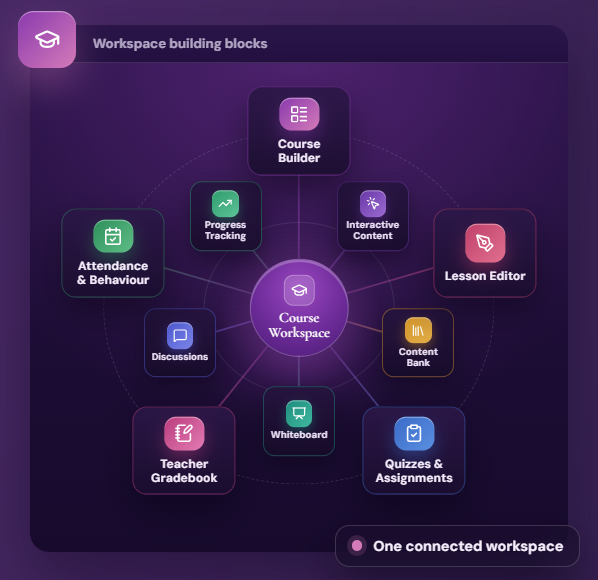
Workspace building blocks
Course Workspace
Interactive Content
Content Bank
Whiteboard
Discussions
Progress Tracking
Course Builder
Lesson Editor
Quizzes & Assignments
Teacher Gradebook
Attendance & Behaviour
One connected workspace

The Course Workspace

Everything a teacher does for a course lives in one beautiful workspace — build courses, add activities, assess, track attendance and behaviour, and talk with the class, all without switching tools.

Build your course, your way
Chapter-by-chapter structure — lessons, quizzes, assignments, files, media and interactive activities, reordered with a drag.
A rich, living editor
Tables, equations, drawing, shapes, 3D models, images, video and embeds — lessons that look beautiful.
Whiteboard & live lesson
Teach live, sketch, and record the board together with your camera into one shareable video.
Assess in place
Quizzes, attendance and behaviour all tracked without ever leaving the course you're teaching.
Your gradebook, your rules
Each teacher chooses which work counts toward a student's ongoing continuous assessment.
Reuse & scale
Save any lesson to the content bank and reuse it across courses and years.

Because every stage lives in one place, a lesson you build flows straight into live teaching, assessment and the content bank — one continuous loop, not a drawer of disconnected tools.

AI Planning
Standards-aligned

AI Planning

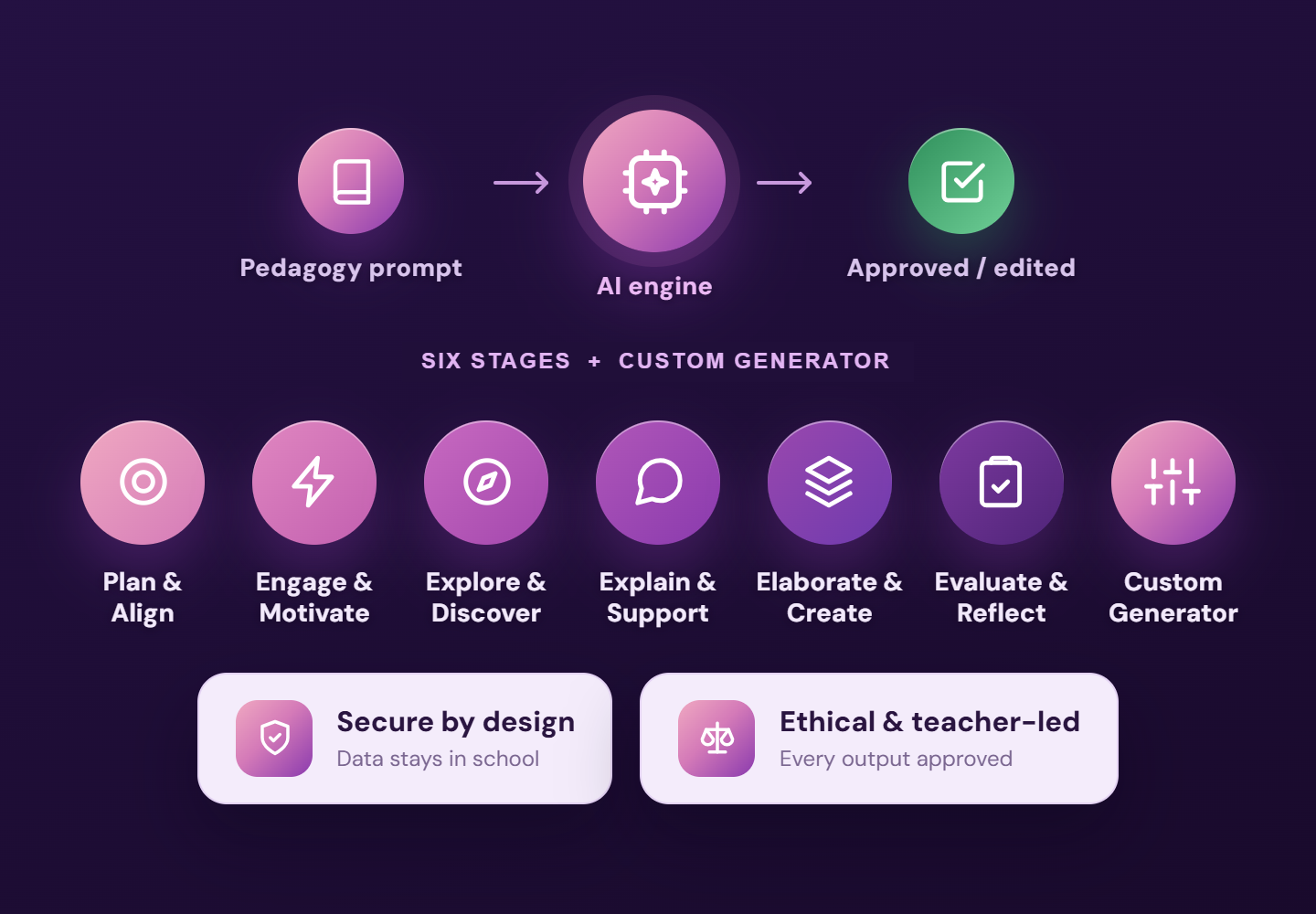
Not a chatbot bolted on. Eduskyline's planning assistant runs on a pedagogy engine — every prompt is engineered around real teaching logic, so what it produces is standards-aligned, coherent and classroom-ready.

Built on a pedagogy engine
Planning follows a full instructional flow, not a blank box — from aligning outcomes through to evaluation and reflection.
Aligned to standards & outcomes
Every objective, activity and resource is mapped to your curriculum outcomes and the right cognitive level — coherent from aim to assessment.
Complete, ready-to-teach lessons
One pass drafts objectives, activities, discussion prompts and materials — a full lesson to refine, not build from a blank page.
Safe, ethical & teacher-led
Identifiable student data never leaves the school, and every output is a draft the teacher reviews, edits and approves.

The prompt logic behind the planner — our pedagogy engine — is what makes the output classroom-ready, not generic. See exactly how it's built in a personal demo.

AI Assessment
AI + manual

AI Assessment

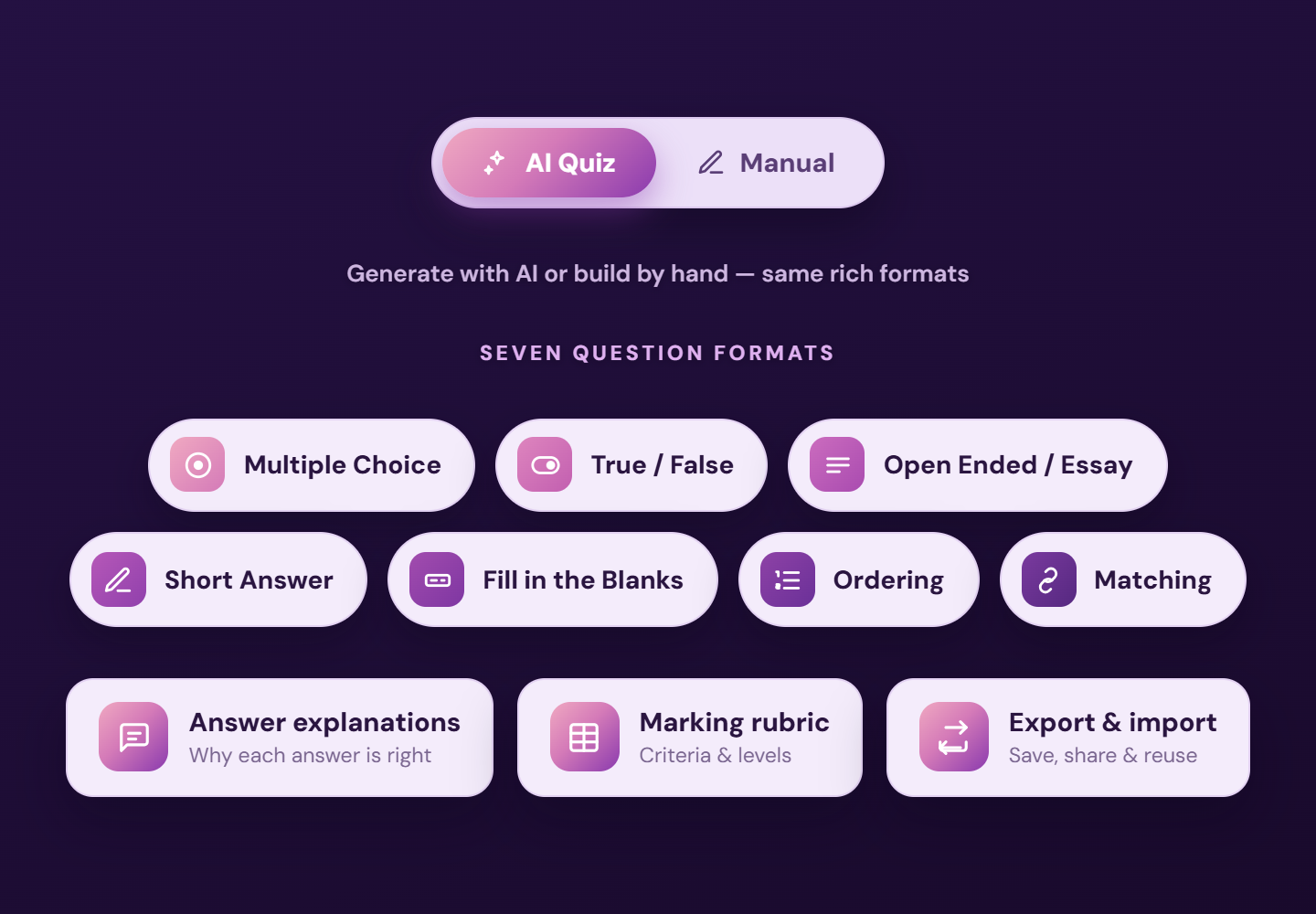
The same pedagogy engine, pointed at assessment. Generate a quiz with AI or build it by hand in the same rich formats — mapped to outcomes, ready to export and reuse.

AI Quiz & manual quiz
Write questions yourself or generate them with AI — mapped to outcomes and the right cognitive level — then export and reuse across courses.
Seven question formats
Multiple choice, true/false, open-ended/essay, short answer, fill-in-the-blanks, ordering and matching — mixed freely in one assessment.
Explanations & rubrics
Each item can carry a model answer, a written explanation and a marking rubric — so grading is transparent and consistent.
Aligned to the world's assessments
Practice matched to PISA, PIRLS, MAP, SAT/PSAT, IGCSE, IELTS and TOEFL — without leaving the lesson.

AI drafts, the teacher decides — every generated item is reviewed, edited and approved before it ever reaches a student.

Grades & Reporting
Approved & locked

Grades & Reporting

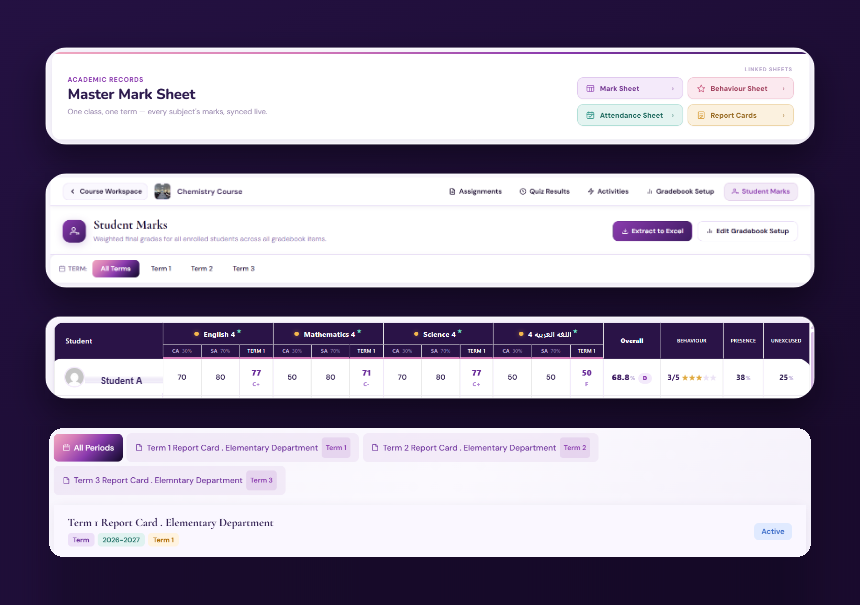
Polished, professional, effortless reporting — from continuous assessment owned by the teacher to the official record signed off by leadership.

The Teacher Gradebook
Each teacher builds their own gradebook, choosing exactly which assignments and quizzes count toward ongoing performance.
Performance Overviews
Automatic, shareable and always current — sent to leadership, students and parents on whatever rhythm suits the school.
The Mark Sheet
The authoritative marks engine. Marks are entered, then approved and locked; only an administrator can unlock. Exports cleanly to Excel.
Report Cards
Print-ready and truly yours — your logo, stamps, signatures and layout, with show/hide control over grades, GPA, rank, comments and summaries.
Behaviour & Attendance Sheets
Behaviour and attendance finalised fairly per term, flowing straight into the report card — no double entry.
Grade Insights
A school-wide window on academic performance, so leadership can read the whole picture at a glance.

Two records, never confused: the Performance Overview tracks progress and keeps parents updated; the Mark Sheet is the official, admin-controlled result. One for follow-up, one for the record.

Attendance & Safeguarding
Bus → bell

Attendance & Safeguarding

Eduskyline is built safeguarding-first: attendance that starts before the gate, with the checks that catch what slips through the timetable.

Attendance, right where you teach
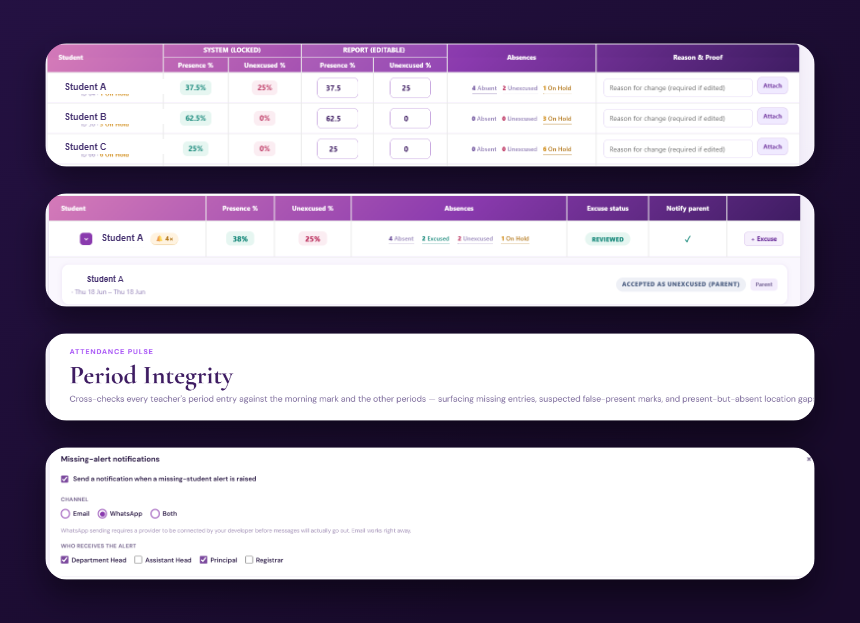
Take and see attendance inside the course, with at-a-glance day context — present, late, early-leave.
Safeguarding, from bus to bell
Attendance that starts at the school bus, with early-leave and permission tracking and period-integrity auditing.
Missing-student alerts
The moment a student can't be accounted for, an alert reaches your Principal, Heads and Registrar — over WhatsApp or email.
Excuse management
Review absences and approve or reject excuses day by day, with a complete audit trail.
Parent excuse submission
Parents submit an excuse and track its status from their phone — no phone calls, no paper notes.
Attendance integrity
Quiet, built-in checks that keep the attendance record complete and trustworthy behind every report.
Behaviour Management
6 dimensions

Behaviour Management

Rate behaviour in the moment across the dimensions that matter — and let a consistent picture build that feeds straight into reporting.

Behaviour, in the moment
Rate students directly from the course across participation, punctuality, respect, teamwork, homework and positive recognition.
A fair cycle
Weekly, monthly or termly — a consistent, evidence-based picture that builds over time.
Behaviour Pulse
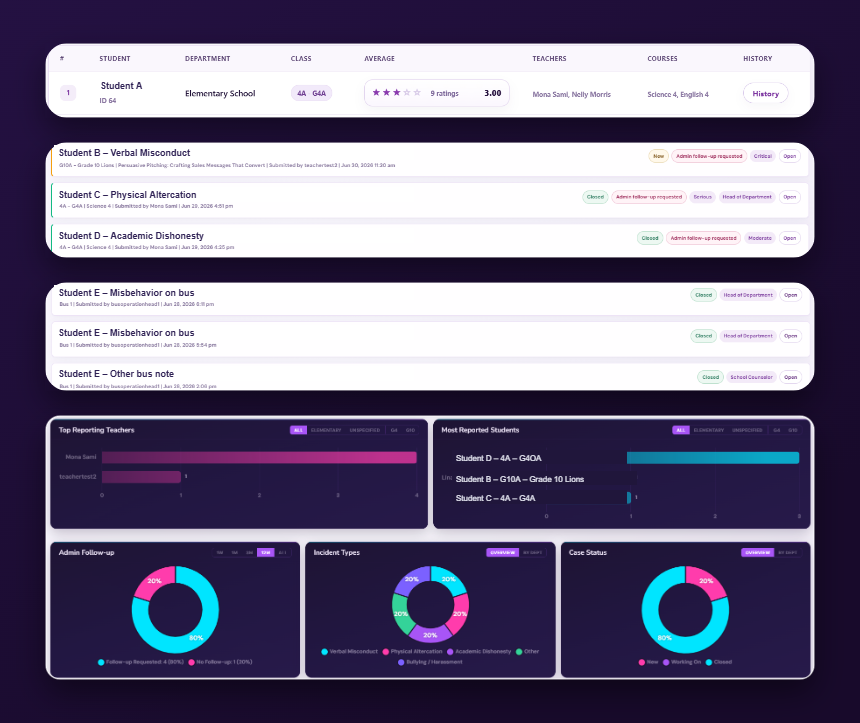
Elegant analytics that surface patterns across classes and departments, helping schools support students sooner and more fairly.
The Behaviour Sheet
Everything brought together into one fair, final rating for each student's report card.
Incident management
Incidents logged with category, severity and witnesses, then followed up and closed — nothing lost.
Full accountability trail
Every incident records who acted, what was done and when it was resolved.
Insights & Analytics
Updated live

Insights & Analytics

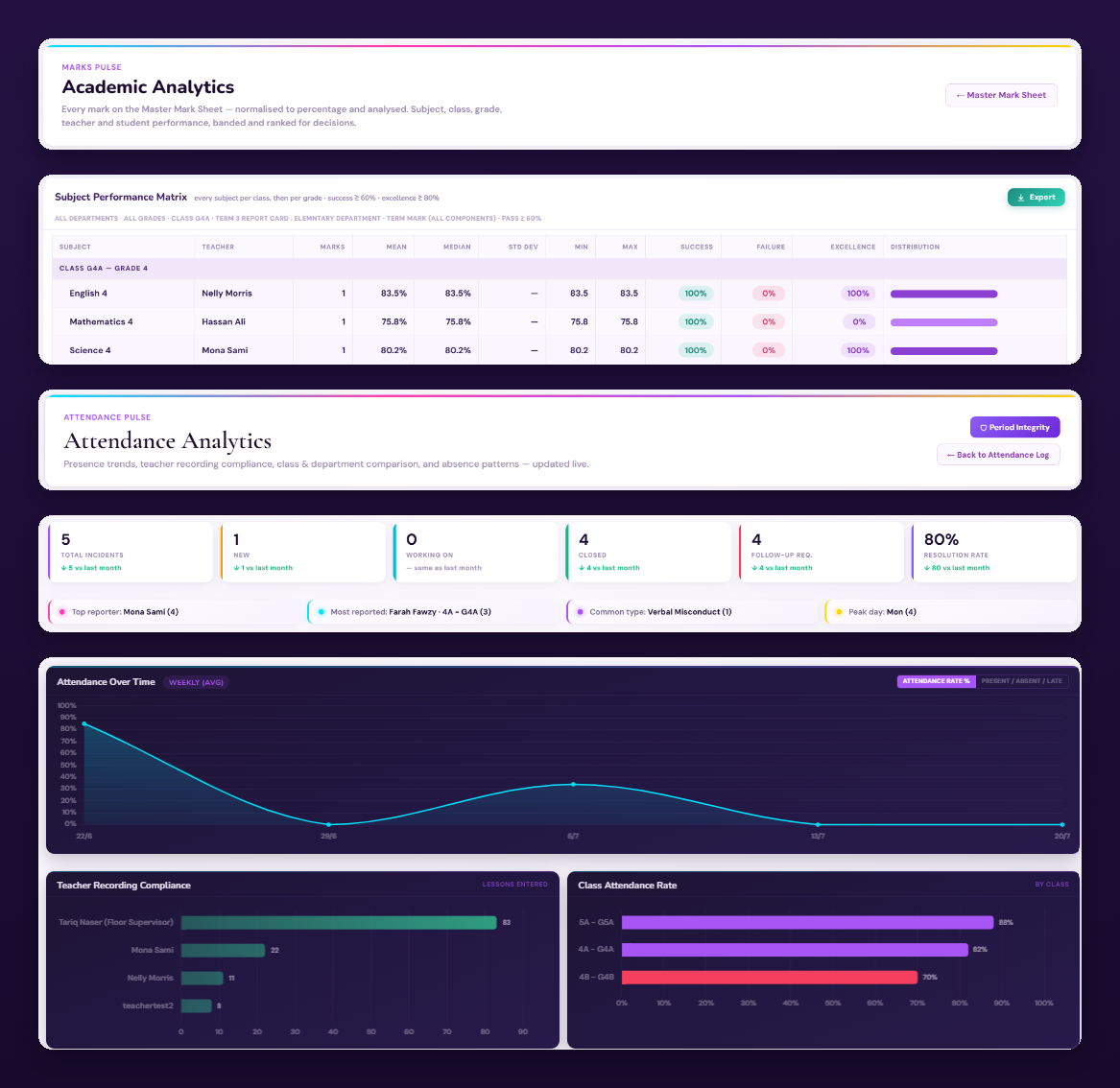
Every attendance mark, behaviour rating and grade already lives in Eduskyline — so the analytics build themselves. No exports, no spreadsheets, no reconciling.

Marks Pulse
Academic analytics that turn raw scores into clear stories across classes and cohorts.
Attendance Pulse
Live attendance intelligence — presence, lateness and absence visualised as trends. Spot students slipping early.
Behaviour Pulse
Behaviour patterns surfaced across classes and departments, so support arrives sooner and more fairly.
Grade Insights
A school-wide window on academic performance — subjects, classes and cohorts compared at a glance, so leadership sees who's thriving and who needs support.
Built from your own data
Analytics draw straight from daily attendance, behaviour and marks — always current, never re-entered.
Spot problems early
Patterns surface while there's still time to act, not at the end of term.
Communication & Community
Role-targeted

Communication & Community

A private, governed community space and a personal noticeboard — every message reaching exactly the right people.

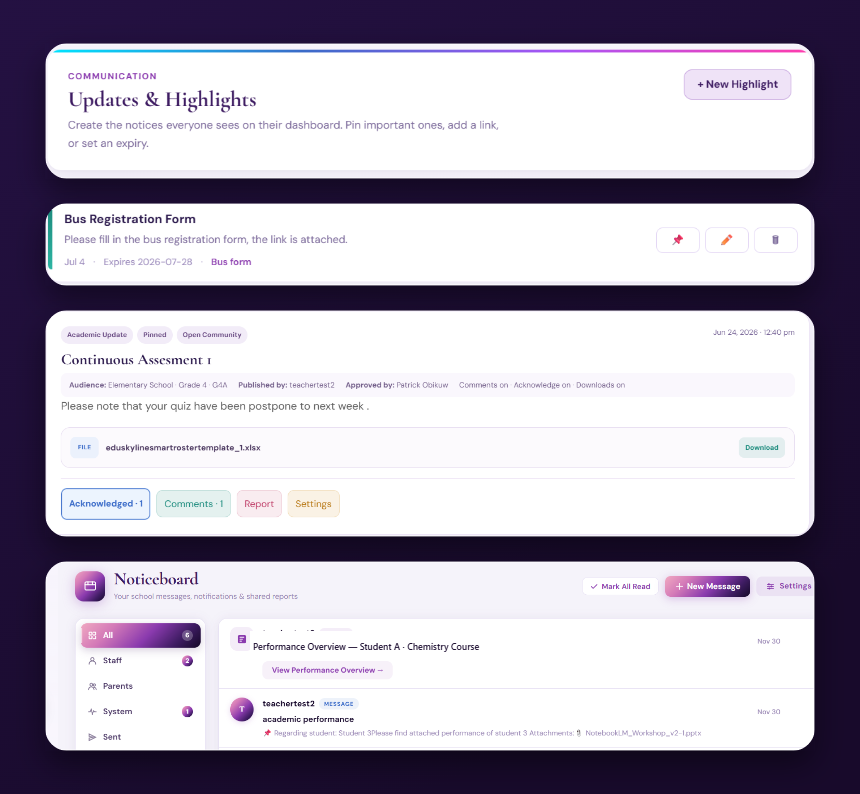
Posts & Announcements
Staff create posts and attach files, each targeted to a school, department, class or role.
Private Spaces
Restricted spaces for departments, leadership or year groups — sensitive conversations stay contained.
Approval & accountability
Posts pass through an approval queue and every published post shows who signed it off.
Read & acknowledgement tracking
See exactly who has read and acknowledged each post, and who still needs to.
The Noticeboard
Every person's home for what matters to them — announcements, overviews and alerts in one feed.
WhatsApp Integration
Securely deliver each user's access card for instant onboarding, plus key operational alerts.
Engagement & Rewards
Points · badges · ranks

Engagement & Rewards

Motivation built into everyday learning — recognition students can see, and teachers control.

Points & badges
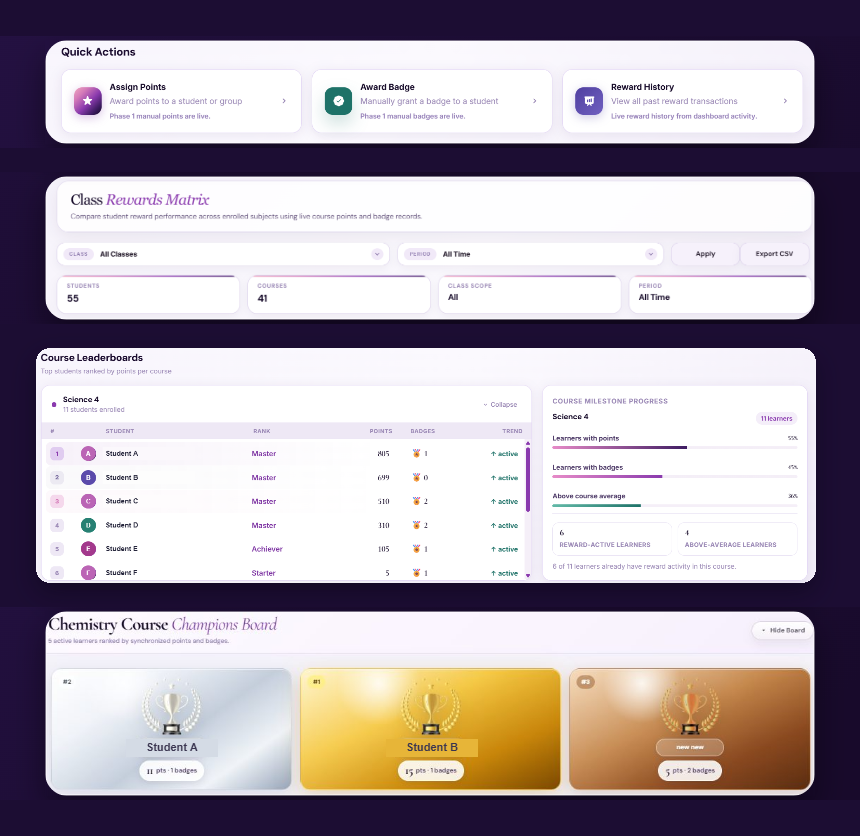
Award points and badges manually or let them accrue automatically as students progress.
Course Champions
Class leaderboards that spotlight top learners and keep healthy motivation flowing through every course.
My Rewards
Each student's personal wall of points, badges and milestones — a motivating record of how far they've come.
Class Matrix
A clear grid for managing rewards and recognition across every course the school runs.
Teacher-controlled
Teachers decide what earns recognition, so rewards reflect what each classroom values.
Reward history
Every points and badge transaction recorded, so recognition stays transparent and fair.
Timetable & Schedule
No clashes

Timetable & Schedule

Build the school day once — then let every class, teacher and room fall into place without a single clash.

Smart Schedules
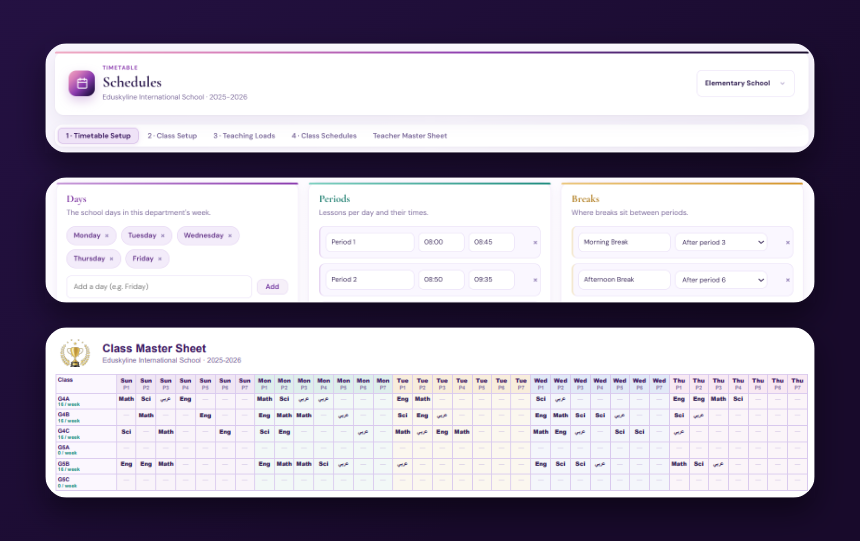
Intelligent timetabling that keeps classes, rooms and shared teachers perfectly coordinated.
Auto-generation
Build a full timetable in one pass, then adjust by hand wherever you need to.
Teaching loads
Balance each teacher's periods across the week before the timetable is published.
Periods, breaks & electives
Define the school day once — periods, break times, electives and blocked slots.
Draft, publish & print
Work in draft until it's right, publish when ready, and print schedules for every class.
Term & calendar setup
Define terms, weeks and key dates once — the whole platform stays aligned to your calendar.
Administration Console
One console

Administration Console

Academic structure, rosters, users and communication — set centrally, applied everywhere.

Academic structure
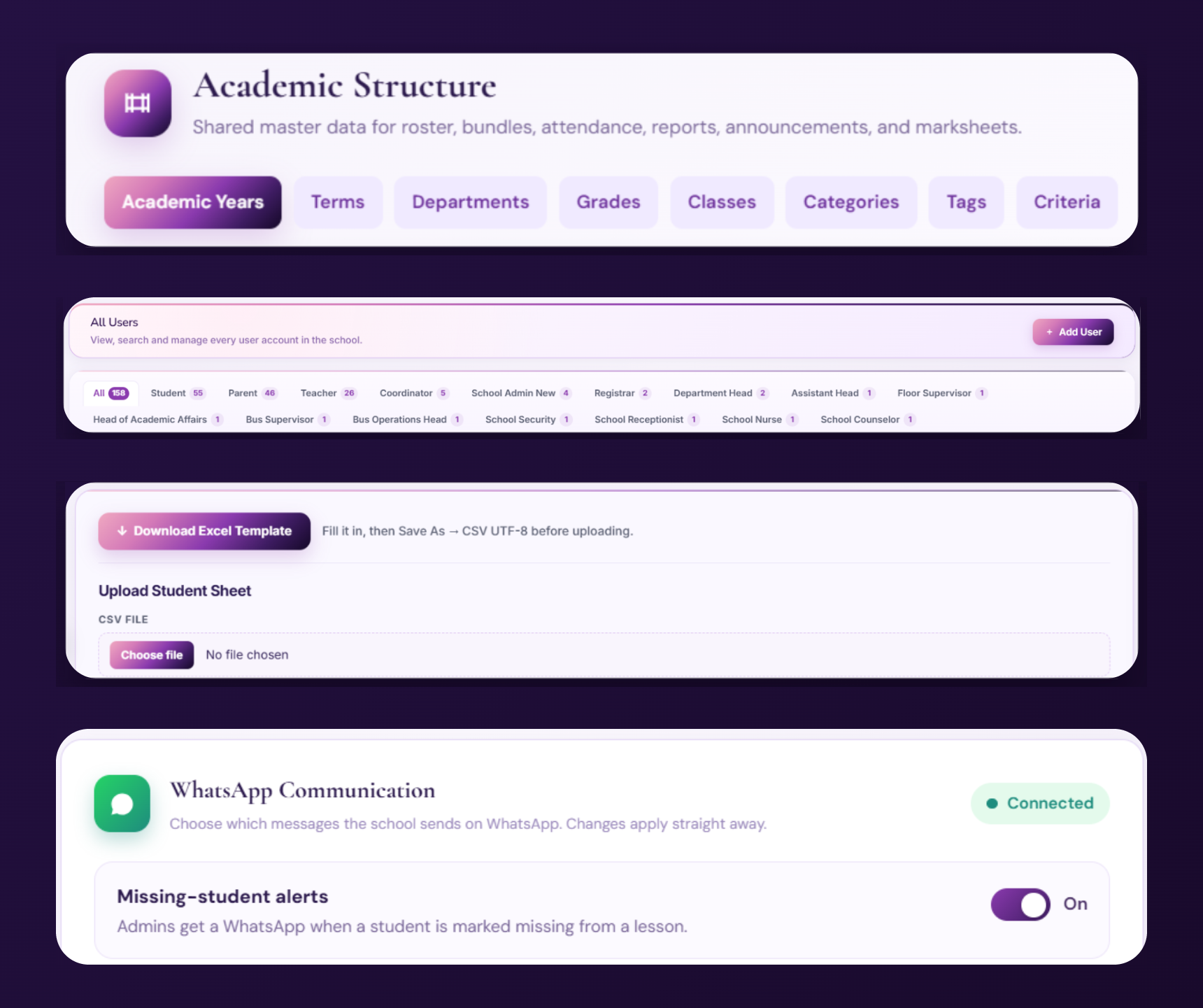
Set years, terms, departments, grades, classes, categories, tags and criteria once — every module reads the same master data.
Roster import
Download the template, fill it in, upload the CSV — the whole school's students and staff are populated in minutes.
WhatsApp communication
Switch on missing-student alerts and send login access cards to a registered WhatsApp number, all from one panel.
Users, roles & access
Manage every account from one place, so each person sees exactly what their role needs — and nothing it shouldn't.
Access cards
Each user's login credentials delivered securely for instant, paperless onboarding.
School branding & settings
Your logo, school details and grading language applied consistently across every module.

Want to see it live?

Every area in depth, a guided walkthrough, and pricing tailored to your school — shared in a personal demo.

Request a Demo
Get Started

Let's bring calm and clarity to your school.

Book a personal demo, or message us on WhatsApp — and we'll show you Eduskyline running a school like yours.

Please use your school or work email — not a personal address. We review every request personally and reply within one working day. Your details stay private.
Prefer to reach us directly?
Email ussupport@eduskyline.com WhatsAppChat with our team Request a QuoteTell us your school size
What happens next
1Tell us about your school — share a few details so we understand your needs.
2Explore the platform — we'll set you up with demo access to see Eduskyline for yourself.
3Online walkthrough — we'll arrange an online session to answer your questions and show how it fits your school.

Private by default — your details are never shared, and there's no spam. Just a genuine conversation about your school.

School login